
Financial security is one of the key things we humans want throughout our entire lifetime. We want to make sure everything runs in a safer way and minimizes the risks of uncertainty.
Thanks to the Social Security System (SSS) in the Philippines, I can proudly say that you just need to follow a few steps, and the rest is handled by the state, freeing you from worry about your future and retirement plans
With this complete guide, I will show you how to register for SSS online, step by step, without any hassle. So let’s get started:
What is SSS Online Registration
SSS online registration is the process of creating a My.SSS account, the official online portal of the Social Security System. Through My.SSS, you can register, check your contributions, apply for loans and benefits, and manage your membership details anytime, without visiting a branch.
Benefits of Registering for SSS Online
Registering for SSS offers a number of benefits, including:
Fast and convenient.
Skip the long lines, create your account and manage your records in minutes.
Available anytime.
Access your account from your phone, tablet, or computer whenever you need it.
Track your contributions.
See your posted contributions, loan balances, and benefit status in real time.
Apply for loans and benefits online.
Submit salary loan, calamity loan, and benefit applications without a branch visit.
Set branch appointments.
Book a slot in advance for transactions that still require an in-person visit, like UMID enrollment.
Go paperless.
Save time and reduce the back-and-forth of physical forms.
Who Can Apply for SSS Online Registration
SSS online registration is open to 4 account types:
- Member: for employed, self-employed, voluntary members, OFWs, unemployed spouses
- Employer: for businesses with employees
- Household Employer: for individuals employing kasambahay/domestic workers
- Coverage & Collection Partner: for Accreditation Program Partners, Alkansssya Program Partners, Contribution Subsidy Providers, LGUs/NGAs/GOCCs/SUCs/LWDs, and Professional Associations/Groups
Requirements Before You Register
Before you register for SSS online, you must fulfill these requirements and have these ready.
The requirements depend on which account type you’re registering for.
For Member registration, have these ready:
- Your SS number (or Common Reference Number, if you have a UMID card)
- A valid, active email address — this is where your verification and account details will be sent
- One piece of information previously registered with SSS, such as:
- Your registered mobile number
- Your UMID card or ATM savings account number
- Your Employer/Household ID
- A recent payment reference number or SBR number
- Details from your last SSS loan
- Your transaction number in your Personal Record Form
- The check number of any monthly pension
- A valid government-issued ID for verification
If you’re applying for an SS number for the first time, also prepare a valid ID and your basic personal details, since you’ll need to complete a Personal Record/UMID application form first.
For Employer registration, have ready:
- Your Employer ID Number
- Your complete business address
- A company email address
For Household Employer registration, have ready:
- Your Household Employer ID Number
- A household email address
For Coverage & Collection Partner registration, have ready:
- Your Agency/Partner Reference Number (84, 85, or 86 series prefix)
- Date of Coverage
- SS Number and surname of your representative and alternate representative
For First-Time Applicants (No SS Number Yet)
If you don’t already have an SS number, you need to register for one before diving into online registration. Here’s the process:
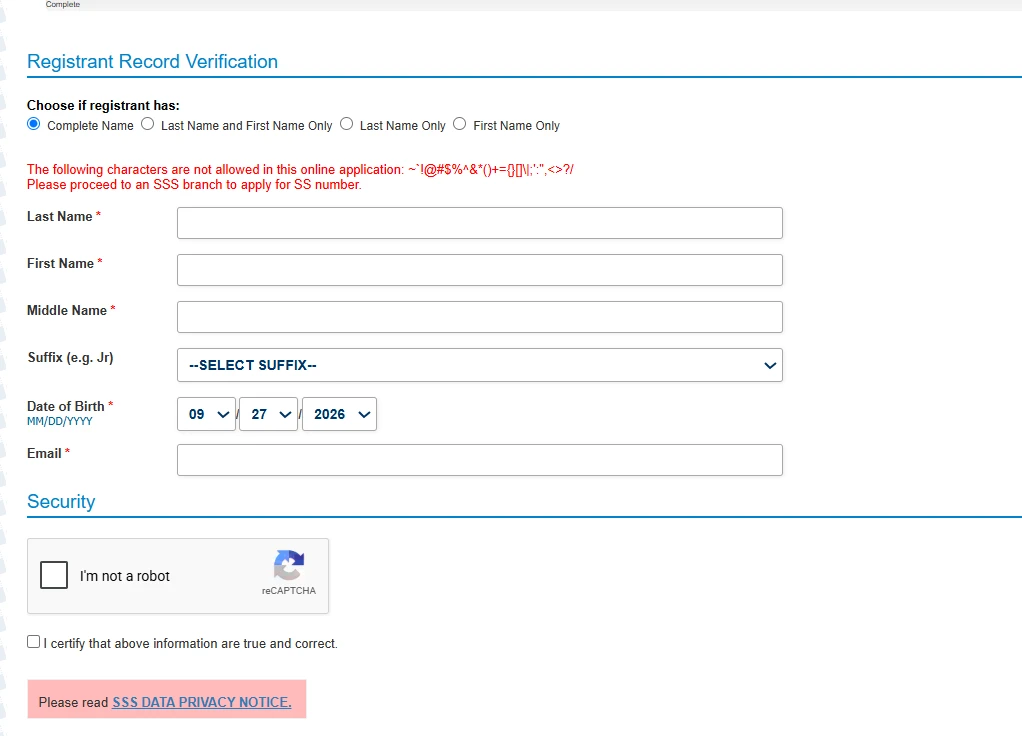
Visit the official SSS Personal Record page. Click the Start button to begin.
Step 1: Fill out the Registrant Record Verification form
- Choose whether you have a Complete Name, Last Name and First Name Only, Last Name Only, or First Name Only
- Enter your Last Name, First Name, Middle Name, and Suffix (if applicable)
- Enter your Date of Birth (MM/DD/YYYY)
- Enter your Email
- Complete the “I’m not a robot” captcha
- Check the box certifying your information is true and correct
- Review the SSS Data Privacy Notice, then submit
Step 2: Check your email and click the verification link
This confirms your submission and lets you continue the application.
Note: the link expires in 5 working days. If it expires, you’ll need to repeat the whole registration process.
Step 3: Supply all remaining required information
Complete any additional fields the form asks for.
Step 4: Click “Generate SS Number”
This generates your actual SS Number and lets you view and print your form, SS Number Slip, and Transaction Number Slip. PDF copies are also emailed to you.
Step 5: Check your email again
You’ll receive your My.SSS account activation link, plus a List of Required Supporting Documents you’ll need to submit for your SS Number.
Step 6: Visit an SSS branch
Present your Transaction Number Slip and supporting documents to the E-Center personnel to finalize your SS Number application.
Step-by-Step Guide to SSS Online Registration
You will need to follow these steps carefully to register easily and safely, without any hassle:
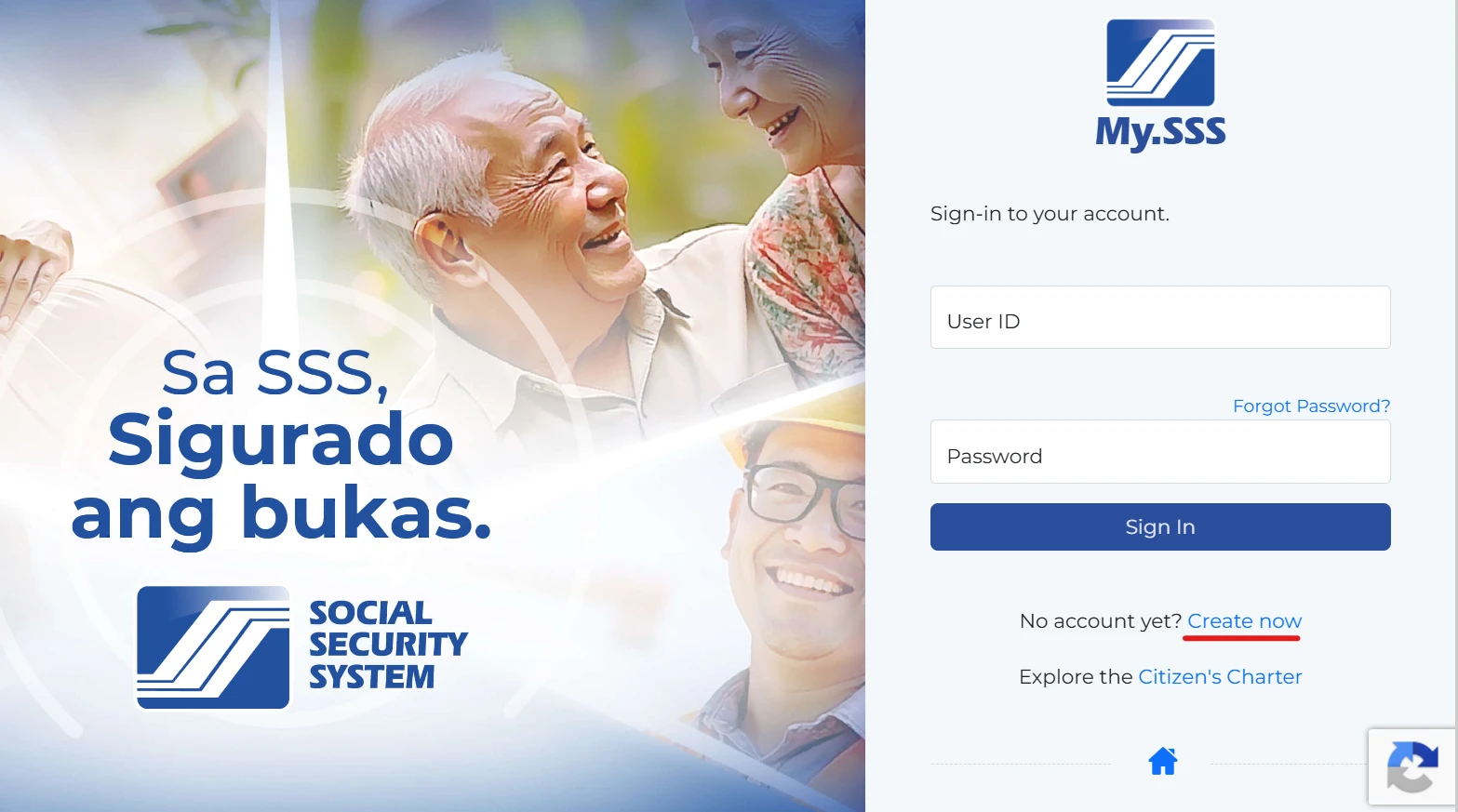
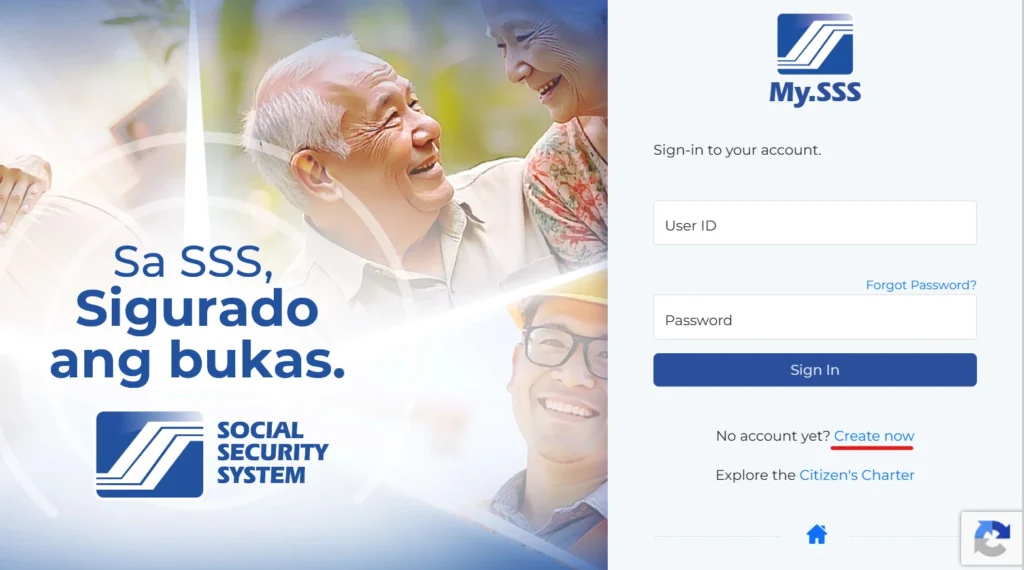
Step 1: Go to the Member Portal
Visit the SSS member portal on the official SSS member registration site. On the login page, click “Create now” next to “No account yet?”
Note: this is the only official SSS member registration site, be cautious of unofficial look-alike sites.
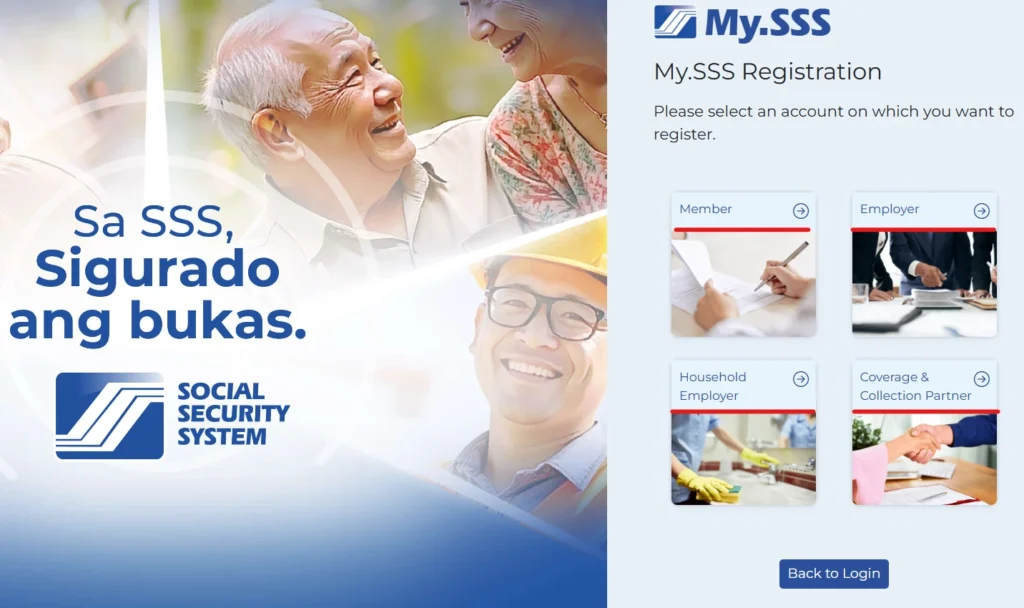
Step 2: Choose your account type
You’ll land on the My.SSS Registration page with four options: Member, Employer, Household Employer, or Coverage & Collection Partner. Click the one that applies to you.
A. Member Registration
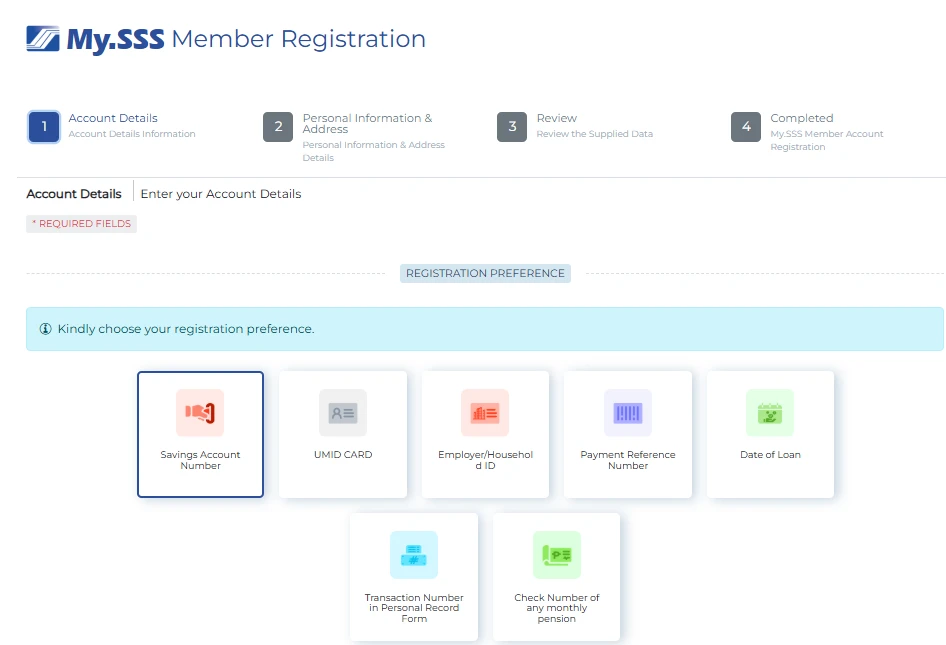
This is a 4-step process: Account Details → Personal Information & Address → Review → Completed.
Step 3: Choose your Registration Preference
Select one verification method from the options shown:
- Savings Account Number
- UMID Card
- Employer/Household ID
- Payment Reference Number
- Date of Loan
- Transaction Number in Personal Record Form
- Check Number of any monthly pension
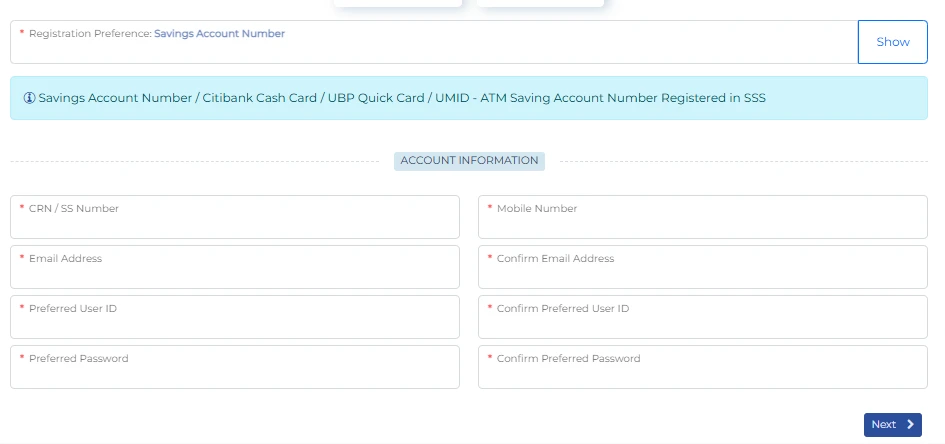
Step 4: Fill out Account Information
- CRN / SS Number
- Mobile Number
- Email Address + Confirm Email Address
- Preferred User ID + Confirm Preferred User ID
- Preferred Password + Confirm Preferred Password
Step 5: Complete Personal Information & Address
Step 6: Review your details, then submit to reach the Completed confirmation screen.
B. Employer Registration
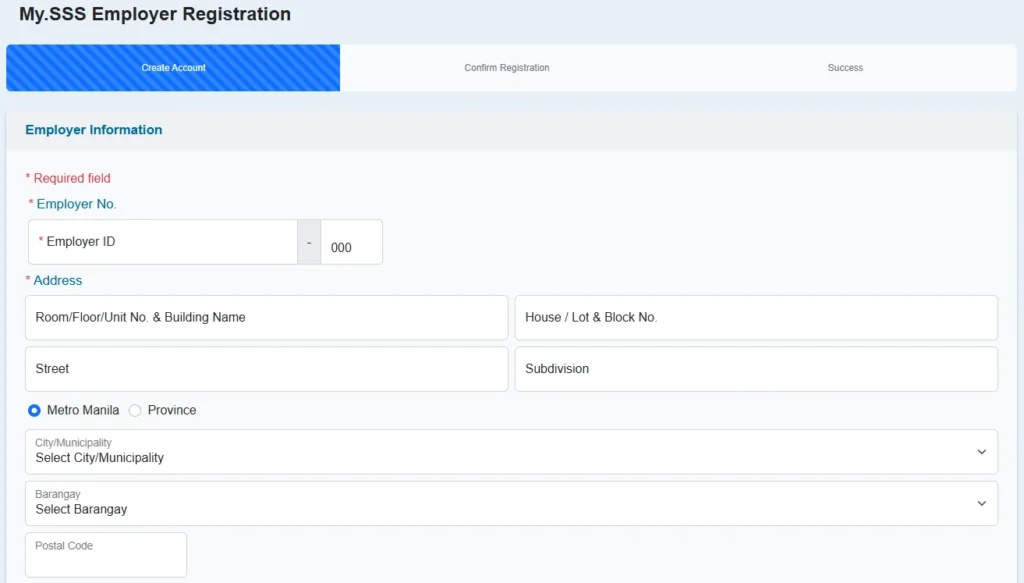
This is a 3-step process: Create Account → Confirm Registration → Success.
Step 3: Enter Employer Information
- Employer No. (Employer ID)
- Address (Room/Floor/Unit, House/Lot/Block No., Street, Subdivision, Metro Manila or Province, City/Municipality, Barangay, Postal Code)
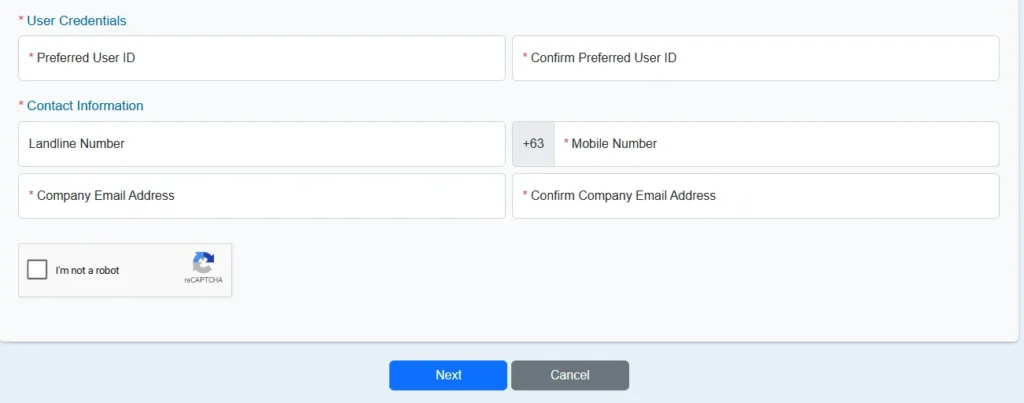
Step 4: Set User Credentials
- Preferred User ID + Confirm Preferred User ID
Step 5: Fill in Contact Information
- Landline Number (optional)
- Mobile Number (+63)
- Company Email Address + Confirm Company Email Address
Step 6: Complete the “I’m not a robot” captcha, then click Next to confirm registration.
C. Household Employer Registration
Also a 3-step process: Create Account → Confirm Registration → Success.
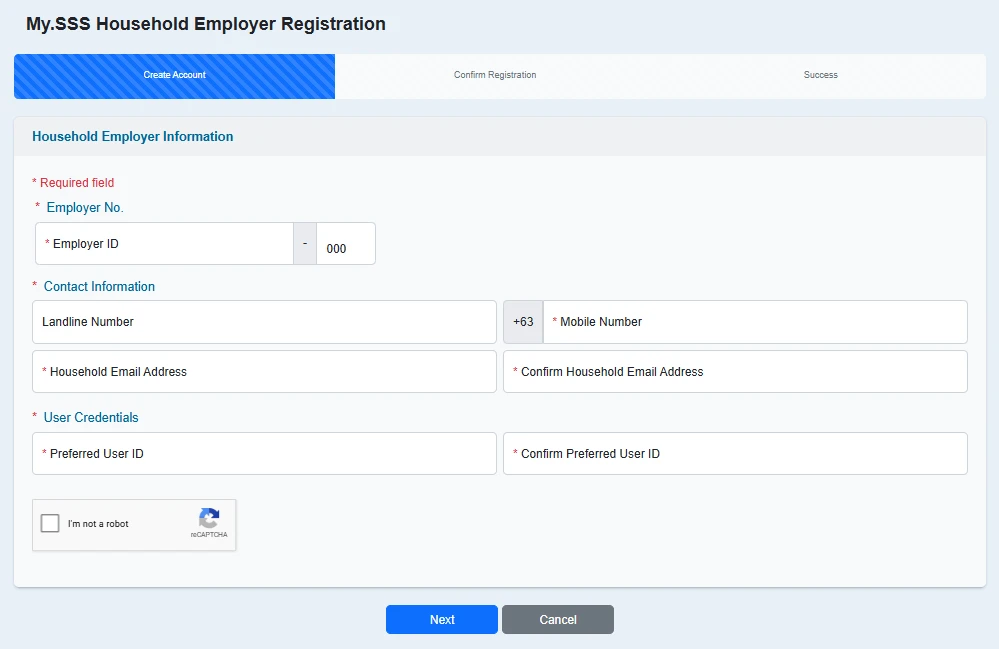
Step 3: Enter your Employer No. (Employer ID)
Step 4: Fill in Contact Information
- Landline Number (optional)
- Mobile Number (+63)
- Household Email Address + Confirm Household Email Address
Step 5: Set User Credentials
- Preferred User ID + Confirm Preferred User ID
Step 6: Complete the captcha, then click Next.
D. Coverage & Collection Partner Registration
For Accreditation Program Partners, Alkansssya Program Partners, Contribution Subsidy Providers, LGUs/NGAs/GOCCs/SUCs/LWDs, and Professional Associations/Groups.
Also 3 steps: Create Account → Confirm Registration → Success.
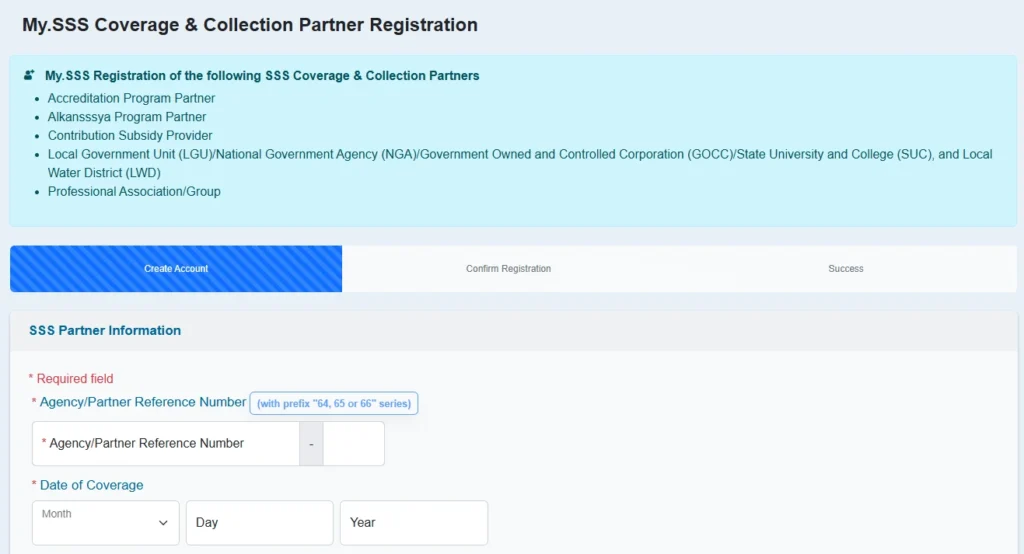
Step 3: Enter your Agency/Partner Reference Number (with the appropriate prefix — 84, 85, or 86 series)
Step 4: Enter Date of Coverage
Step 5: Provide Representative details
- Name of Representative (SS Number + Surname)
- Name of Alternate Representative (SS Number + Surname)
Step 6: Set User Credentials
- User ID (SSS recommends using your partner acronym, e.g. DSWDMAIN) + Confirm User ID
Step 7: Fill in Partner Contact Information
- Partner Official Email Address + Confirm Partner Official Email Address
- Landline Number (optional)
- Mobile Number (+63)
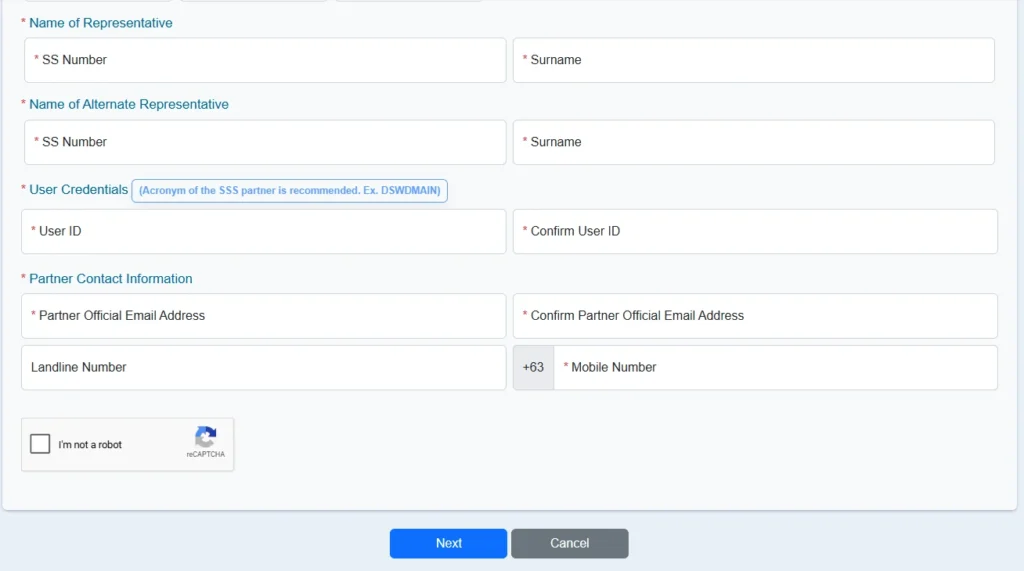
Step 8: Complete the captcha, then click Next.
Pro Tip: Register during off-peak hours (early morning or late evening), the SSS website tends to run faster when fewer members are online.
Common Problems & Fixes
Didn’t receive your verification email?
Check your Spam or Promotions folder first. If it’s still missing, try registering again using the same email, or reach out through the channels below.
“Account already exists” error?
This usually means you (or someone using your details) already created a My.SSS account before. Use the “Forgot User ID/Password” option instead of registering again.
Registration form won’t submit or keeps timing out?
Try a different browser, clear your cache, or switch to a more stable internet connection. Peak hours can also slow down the system — try again later at night or early morning.
Mismatched personal details?
Make sure the information you’re entering exactly matches what’s on file with SSS (name spelling, birth date, etc.). Even small mismatches can cause verification failures.
Still stuck after trying everything?
Reach out to SSS directly:
- Hotline: 1455 (landline and mobile, nationwide)
- OFW Relations: (+632) 8364-7796 / 8364-7798
- As a last resort, post your concern on the official SSS Facebook page with your registered email and the date you attempted registration, or visit your nearest SSS branch for in-person assistance.
FAQs About SSS Online Registration
Q1: Is SSS online registration free?
Yes, creating and using a My.SSS account is completely free.
Q2: Can I register if I don’t have a CRN?
Yes. You can use other verification options instead, such as your registered mobile number, UMID card, or a past loan or payment reference.
Q3: Can OFWs register online from abroad?
Yes, OFWs can register through the same Member Portal. SSS also has dedicated OFW relations contact lines for additional support.
Q4: How long does registration and verification take?
It’s usually completed within minutes if all your details match SSS records. Delays typically happen due to mismatched information or high website traffic.
Q5: What if I forgot my My.SSS User ID or password?
Use the “Forgot User ID” or “Forgot Password” links on the Member Portal login page, and follow the recovery steps using your registered email.
Q6: Is employer registration the same as member registration?
No. Employers register separately using an Employer ID Number, not a personal SS number or CRN.
Conclusion
That’s it. If you follow the steps above, you’ll be able to register for SSS online easily. Registering through My.SSS takes away the hassle of long branch lines and paper forms, giving you full control over your contributions, loans, and benefits from anywhere.
The best part is, it only takes a few minutes to set up, but it can save you hours down the road, especially when you need to file a claim quickly. If you haven’t created your My.SSS account yet, it’s a good time to do it.
2 thoughts on “SSS Online Registration: Complete Guide 2026”